
- Joined
- Mar 22, 2025
- Messages
- 50
Syncronorm Depence 2.3.6: Advanced Simulation Software for Professional Event and Show Design
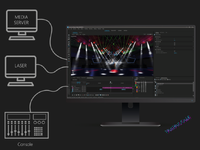
Syncronorm Depence is a professional-grade simulation and visualization software designed for event planners, lighting designers, and show production professionals. The platform enables users to create realistic virtual environments where complex lighting setups, stage designs, and multimedia effects can be planned, tested, and optimized before real-world implementation.In modern event production, precision and visualization are essential. Syncronorm Depence helps professionals reduce risk, save time, and improve creative outcomes by providing an accurate digital preview of live shows, concerts, exhibitions, and architectural lighting projects.
Why Syncronorm Depence Is Essential for Event Visualization
Realistic Pre-Production Planning
Large-scale productions often involve multiple technical components, including lighting fixtures, video systems, and stage elements. Syncronorm Depence allows designers to simulate entire setups virtually, ensuring everything works perfectly before installation begins.Improved Collaboration and Decision Making
The software provides a shared visual reference for teams, clients, and stakeholders. This improves communication and allows faster approvals by showing exactly how a project will look in real environments.Powerful Simulation and Visualization Capabilities
High-Quality 3D Rendering
Syncronorm Depence delivers realistic 3D visualizations with accurate lighting behavior, reflections, and environmental effects. Designers can preview shows under different conditions and adjust settings instantly.Advanced Lighting Simulation
The platform supports detailed lighting control, enabling users to test fixture placement, beam angles, color effects, and intensity levels within a virtual environment.Real-Time Scene Interaction
Users can modify scenes dynamically and immediately see the results, making the creative process more efficient and interactive.Features and Benefits
Key Features Explained in Simple Language
Realistic 3D Event Simulation
Create detailed virtual models of venues, stages, and lighting systems.Benefit: Helps designers visualize projects before physical setup, reducing costly mistakes.
Accurate Lighting Calculations
Simulates real-world lighting behavior with precision.Benefit: Ensures optimal lighting performance during live events.
Extensive Fixture Library
Includes a wide range of professional lighting equipment models.Benefit: Saves time by allowing designers to work with familiar tools digitally.
Real-Time Rendering Engine
Displays changes instantly as adjustments are made.Benefit: Speeds up design workflows and improves creativity.
Show Programming Integration
Supports synchronization with lighting control systems.Benefit: Enables smoother transitions from design to live production.
Custom Environment Creation
Users can build or import venue models for realistic simulations.Benefit: Provides accurate planning tailored to specific locations.
Streamlining Event Production Workflows
From Concept to Execution
Syncronorm Depence bridges the gap between creative ideas and technical implementation. Designers can experiment with layouts, effects, and timing before equipment is installed, minimizing setup challenges during live events.Enhanced Client Presentations
Visual simulations help clients understand design concepts clearly. Instead of imagining outcomes, stakeholders can experience realistic previews of shows and installations.Efficient Project Adjustments
Changes requested during planning stages can be applied instantly, allowing faster revisions without rebuilding physical setups.Ideal Applications Across Industries
Concerts and Live Entertainment
Designers can simulate concerts, festivals, and stage performances with precise lighting and visual effects.Architectural Lighting Projects
The software helps visualize building illumination and outdoor installations before implementation.Corporate Events and Exhibitions
Event planners can present immersive layouts and lighting concepts for conferences and trade shows.Film and Broadcast Production
Production teams use simulation tools to plan lighting setups for studios and filming environments.Performance and User Experience
Professional Yet Intuitive Interface
Despite its advanced capabilities, Syncronorm Depence offers an organized interface that simplifies navigation. Both experienced designers and newcomers can quickly adapt to its workflow.High Performance Rendering
The software is optimized for smooth performance, ensuring detailed simulations without compromising speed or stability.Reliability and Accuracy
Precision-Based Design Environment
Syncronorm Depence focuses on accuracy, ensuring simulations closely match real-world results. This reliability helps professionals make confident design decisions.Reduced Production Risks
By identifying potential issues during the planning stage, the software minimizes unexpected technical problems during live execution.Conclusion: A Complete Visualization Solution for Event Professionals
Syncronorm Depence software stands as a leading simulation platform for event and lighting design professionals seeking precision, creativity, and efficiency. Its realistic visualization tools, advanced lighting simulations, and real-time rendering capabilities allow users to plan complex productions with confidence.By transforming ideas into immersive virtual experiences, Syncronorm Depence helps designers deliver visually stunning events while reducing costs and production risks. For professionals aiming to achieve flawless show execution and enhanced creative control, this software provides a powerful and reliable solution tailored to modern event production demands.